Token Usage Estimator
Estimate token usage per MCP server using tiktoken. Track input and output tokens per tool, export to CSV for analysis, and monitor live counters in the TUI.
Quick Reference
| Property | Value |
|---|---|
| Handler | token_usage |
| Type | Auditing |
| Scope | Global |
| Default Critical | false (fail-open — observability should not block traffic) |
How It Works
The Token Usage Estimator plugin:
- Intercepts MCP requests, responses, and notifications
- Estimates token counts using tiktoken's
cl100k_baseencoding - Tracks input tokens (server responses into LLM) and output tokens (tool call requests from LLM) per tool
- Writes per-event CSV rows for historical analysis
- Maintains a JSON state file for live TUI display
Accuracy Note: Token estimates use tiktoken's
cl100k_basetokenizer when available (~88% accurate), or a pure-Python heuristic fallback otherwise. Either way, these numbers are for monitoring and trend analysis, not exact billing data. See Estimation Methods below.
Estimation Methods
The plugin uses two estimation methods, selected automatically:
tiktoken (default on macOS/Linux)
Uses OpenAI's cl100k_base tokenizer for ~88% accuracy across models. This is a compiled library installed automatically on macOS and Linux.
Heuristic fallback (automatic on Windows)
A pure-Python estimator that uses max(chars/4, words*1.33) as a rough approximation. Less accurate than tiktoken but requires no native dependencies. The heuristic is used automatically when tiktoken is unavailable.
Windows and WDAC
tiktoken is not installed on Windows by default because its compiled Rust extension (.pyd file) can be blocked by Windows Defender Application Control (WDAC), which prevents Gatekit from starting entirely.
If your Windows environment does not enforce WDAC (or your IT admin has whitelisted Python extensions), you can install tiktoken manually for better accuracy:
pip install tiktoken
If tiktoken is installed but blocked by WDAC at runtime, the plugin falls back to heuristic estimation automatically. To resolve the WDAC block, your IT administrator can create a supplemental WDAC policy that whitelists the Python installation directory using file path rules or publisher-based rules. See Microsoft's App Control documentation for details.
TUI Features
When enabled, the Token Usage Estimator adds live columns to the TUI server list:
| Column | Label | Description |
|---|---|---|
| Input tokens | ↑ | Server responses into the LLM |
| Output tokens | ↓ | Tool call requests from the LLM |
Token counts are displayed in humanized format (e.g., 1.2k, 3.4M).
Context menu actions (right-click or select a token column):
- Reset counters for a specific server
- Reset all server counters
Configuration Reference
output_file
Path to the CSV log file for historical token usage data.
Type: string
Default: logs/token_usage.csv
Required: Yes
Note: Relative paths are resolved relative to the config file's directory.
state_file
Path to the JSON state file used for live TUI counter display and multi-instance coordination.
Type: string
Default: logs/token_usage_state.json
Required: Yes
Note: Relative paths are resolved relative to the config file's directory.
flush_interval_seconds
How often to flush state to disk.
Type: number
Default: 1.0
Range: 0.1–60.0 seconds
YAML Configuration
Minimal Configuration
plugins:
  auditing:
    _global:
      - handler: token_usage
        config:
          output_file: logs/token_usage.csv
          state_file: logs/token_usage_state.json
Full Configuration
plugins:
  auditing:
    _global:
      - handler: token_usage
        config:
          output_file: logs/token_usage.csv
          state_file: logs/token_usage_state.json
          flush_interval_seconds: 1.0
          critical: false
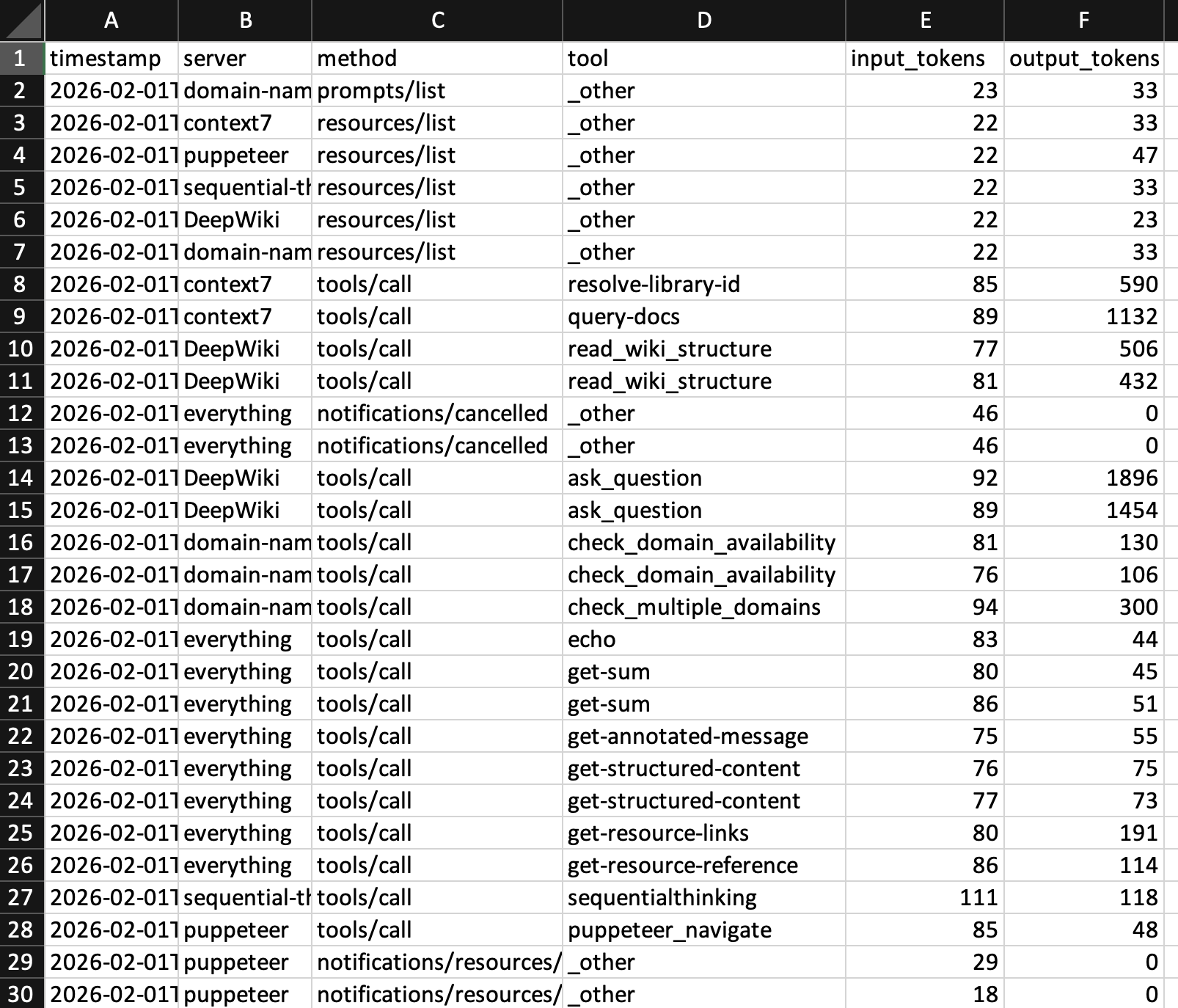
CSV Log Format
The CSV log appends one row per request/response pair:
| Column | Description |
|---|---|
timestamp |
ISO 8601 timestamp (UTC) |
server |
MCP server name |
method |
MCP method (e.g., tools/call, initialize) |
tool |
Tool name for tools/call, otherwise _other |
input_tokens |
Estimated input tokens (server response into LLM) |
output_tokens |
Estimated output tokens (tool call request from LLM) |
Example CSV output:
timestamp,server,method,tool,input_tokens,output_tokens
2026-01-15T10:30:45.123456Z,filesystem,tools/call,read_file,42,1250
2026-01-15T10:30:46.789012Z,filesystem,tools/call,write_file,890,15
2026-01-15T10:30:47.345678Z,github,tools/call,search,125,3400
Analysis tip: Load the CSV into a spreadsheet and create pivot tables by server or tool to identify which tools consume the most tokens.
Multi-Instance Support
The plugin supports multiple gateway processes running concurrently:
- Each gateway instance registers in the state file under its process ID (PID)
- The TUI aggregates token counts across all running instances
- Dead instances (stale PIDs) are automatically cleaned up
- File locking prevents race conditions between instances
- Counters persist across gateway restarts
State Persistence
Token counters are saved to the state file and restored on restart. The state file uses a JSON format with per-PID instance tracking:
- On startup, the plugin restores its counters from the state file
- On shutdown, it removes its own PID entry while preserving other instances
- Reset operations propagate across all instances via reset IDs